
Give It All AI Video Generator
Upload one photo and you rap at the hanging mic in the BigXthaPlug Give It All trend. The packed lobby, the crowd waving flags behind you, the two camera angles and the song are already there.
- 1 photo
- 11 s
- Up to 1080p
- From 100 credits
Rap at the hanging mic with one photo
Your photo
Your photo replaces the rapper at the mic.
No celebrities or public figures. Use photos of yourself or of adults who agreed to it. Photos of famous people, film or TV characters played by real actors, or anyone under 18 are not allowed and can get your account suspended. Content rules
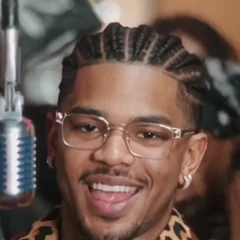
Replaces the rapper at the mic
- One person per photo, face clearly visible. Not a celebrity.
- Face and upper body in view, looking at the camera.
- Even light, no sunglasses or heavy filters.
Quality · 11 s video
- 1 photo
- 11s
- Up to 1080p
- Sound
Your photo replaces the rapper at the mic. The moves, camera and sound stay.
How to do the BigXthaPlug Give It All trend
- 01
Add one photo
Your photo replaces the rapper at the hanging mic. Use one person, face clear and facing the camera, chest up or waist up.
- 02
Pick a quality and generate
Pick Standard 480p, HD 720p or Full HD 1080p, sign in and press Generate. The prompt is built into the template.
- 03
Wait for the performance
The whole 11-second clip is redrawn, which can take 20 minutes or more when the queue is busy. The video stays in your list if you leave the page.
- 04
Download and post
Download the vertical MP4 with the song and no watermark, and post it to TikTok, Reels or Shorts.
What is the Give It All AI trend?
The Give It All AI trend puts your face on a rapper performing “Give It All” at one hanging vintage microphone, in a warmly lit lobby packed with people. You upload one photo. The AI video keeps the performance, the lip-sync, the crowd waving dark flags behind you and the camera, and you are the one at the mic. Some people search for it as the “Give It All to Me” trend.
“Give It All” is a song by BigXthaPlug, the rapper from Dallas. It is on Better Over Time, his fourth solo album, released on October 30, 2026, with 18 tracks. The album is his solo return to hip-hop after his 2025 country hit “I Hope You’re Happy”. A snippet of “Give It All” spread on social media in June 2026, months before the album came out. After the album’s listening party at a Cinemark theater in North Dallas, he performed the song for the guests right outside the theater.
AI versions of the Give It All performance spread on TikTok in November 2026. Most of them start from one photo and keep the original sound, so the new face raps in time with the song.
The template on this page is an 11-second vertical clip with two angles: a face-on close-up at the mic with the crowd behind until 6.3 s, then a side angle under orange neon. Your photo replaces the performer at the mic. The crowd, the lobby, the camera and the sound stay. Melies AI is not affiliated with BigXthaPlug or the song’s rights holders.
Sources: Dallas Observer: BigXthaPlug kicks off the Better Over Time movie experience
- Photo to upload
- 1
- Video length
- 11 s
- Top quality
- 1080p
- Credits from
- 100
Template on Genjutsu 1.0 · Last updated
Is there a free Give It All video maker?
Not for free. One 11-second give it all ai video costs 100 credits at 480p, 200 credits at 720p or 600 credits at 1080p. Credit packs start at $9.90 with no subscription, and a failed video gives its credits back.
Give It All to Me trend FAQ
Something else? Email support@meliesai.com.
More viral AI video templates
Your turn at the mic
One photo, the hanging mic, the packed lobby and the Give It All song built in.
Start creating