
Need for Speed AI Video Generator
Upload one photo of your car and it becomes the hero of a movie-style car scene. Pick a smoky burnout, a pickup roll-out or a street chase at dusk; the camera cars, the crowd at the railing and the engine sound are already there.
- 1 photo
- 14 s or 15 s
- Up to 1080p
- From 100 credits
Put your car in an NFS-style scene
Version
Your photo
Your photo replaces the black coupe.
Vehicles only, no people. Use a photo of your own car or one you have permission to use, with nobody in front of it. The stunts in the video are AI-made; do not try them on real roads. Content rules
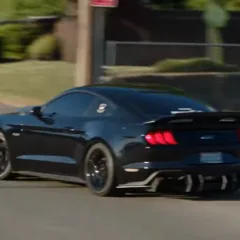
Replaces the black coupe
- One vehicle per photo, bumper to bumper in frame.
- Side or three-quarter angle, so the body shape and wheels show.
- Daylight, no heavy filters, nobody in front of the car.
Quality · 15 s video
- 1 photo
- 15s
- Up to 1080p
- Sound
Your photo replaces the black coupe. The moves, camera and sound stay.
How to do the NFS car trend with one photo
- 01
Pick a scene
Burnout and Street chase suit cars and coupes. Pickup was shot around a lowered truck, so it suits pickups and SUVs. All three cost the same.
- 02
Add one photo of your car
Use a sharp daylight photo of the whole vehicle from the side or a three-quarter angle. The AI copies its body, paint, wheels and stance into every shot.
- 03
Pick a quality and generate
Pick Standard 480p, HD 720p or Full HD 1080p, sign in and press Generate. The prompt is built into the template.
- 04
Download and post
The scene is redrawn shot by shot, which takes several minutes. Download the MP4 with the engine sound and no watermark, and post it to TikTok, Reels or Shorts.
What is the Need for Speed AI trend?
The Need for Speed AI trend puts your own car into a short, movie-style car scene. You start from one still photo of the car. The AI video shows it leaving a parking lot in a smoky burnout, seen from a chasing car’s cabin and by people watching at a railing, then rolling past a drive-thru. The edit looks like a scene from a street-racing film or game.
Tutorials for the trend spread on TikTok in November 2026. Most of them use a photo-to-video template inside an app such as CapCut, or an image model plus a video model with pasted prompts. The name borrows Need for Speed, Electronic Arts’ street-racing game series, but the trend has no connection to EA or the games.
This page has three filmed scenes to choose from. Burnout (15 s, widescreen 2.35:1) is built around a black coupe. Pickup (14 s, 2.35:1) is built around a lowered red single-cab truck, so it suits pickups and SUVs. Street chase (15 s, 16:9) adds headlights at dusk and a low chase down an open street. Your photo replaces the hero vehicle. The people, the other cars, the camera moves and the sound stay.
Sources: TikTok: Need for Speed AI video tutorial (November 20, 2026), TikTok: CapCut Need for Speed template (November 14, 2026)
- Photo to upload
- 1
- Video length
- 14–15 s
- Top quality
- 1080p
- Credits from
- 100
Template on Genjutsu 1.0 · Last updated
Is the NFS AI video generator free?
Not for free. One 15-second need for speed ai video costs 100 credits at 480p, 200 credits at 720p or 600 credits at 1080p; one 14-second need for speed ai video costs 100 credits at 480p, 200 credits at 720p or 600 credits at 1080p; one 15-second need for speed ai video costs 100 credits at 480p, 200 credits at 720p or 600 credits at 1080p. Credit packs start at $9.90 with no subscription, and a failed video gives its credits back.
NFS AI car video FAQ
Something else? Email support@meliesai.com.
More viral AI video templates
Your car, your burnout
One car photo, three movie-style scenes and the engine sound built in.
Start creating